Participant recruitment methods: 5 ways to find people
Participant recruitment methods compared by who you need: your own list, panels, referrals, networks and recruiters, plus a check before you set a date.
Hesitation in usability testing is data. Learn which pauses mean a problem, which mean thinking, and how to pair each pause with a probe and report it.

A pause in a test recording can mean trouble, or nothing at all. You work on the research team at a food delivery company, and you're watching a test of the new checkout. At the payment step, the person stops, then goes back a page. Was that a problem?
That moment is hesitation. Hesitation in usability testing is a useful signal, but it is easy to read too much into.
A pause points to a problem when it repeats at the same step for several people, or when the person's words at that moment show doubt. A single quiet pause may only mean they were reading.
So how do you tell the two apart? Name the kind of pause, rule out the harmless ones, match it to what was said, then count it across sessions.
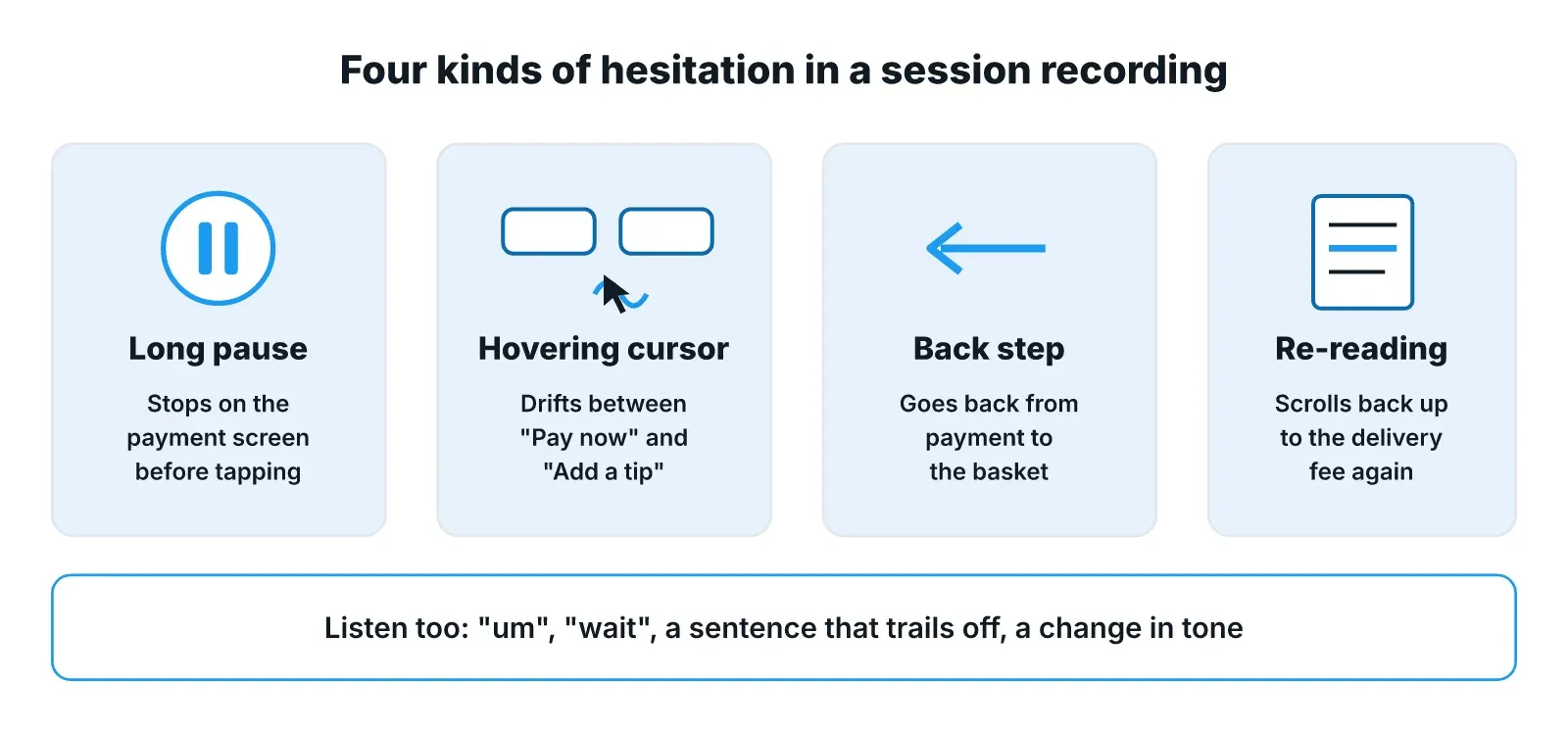
Hesitation is any moment when a person slows down, stops or undoes what they just did. In a session recording it usually shows up in four ways, and each one gives you a different hint about what went wrong. Naming the kind helps you know where to look next, so log it in plain words as you watch.
The person stops moving and says nothing. In the checkout test, they sit on the payment screen for a while before they tap anything. That could be doubt about the total, or they could be reading the delivery time.
The cursor drifts between two buttons, or circles one without clicking. Say the person hovers between "Pay now" and "Add a tip". That often means they aren't sure which button does what they want.
The person goes back a page, removes an item or clears a field they just filled. In the checkout, going back from payment to the basket is a strong hint that something on the payment screen surprised them.
The person scrolls back to text they already passed, or reads the same line twice. If they scroll up to the delivery fee three times, the fee is probably hard to find or hard to trust.
Spoken signs count too. Listen for "um", "wait", a sentence that trails off or a change in tone. These are often the quickest way to tell which of the four kinds you just saw.
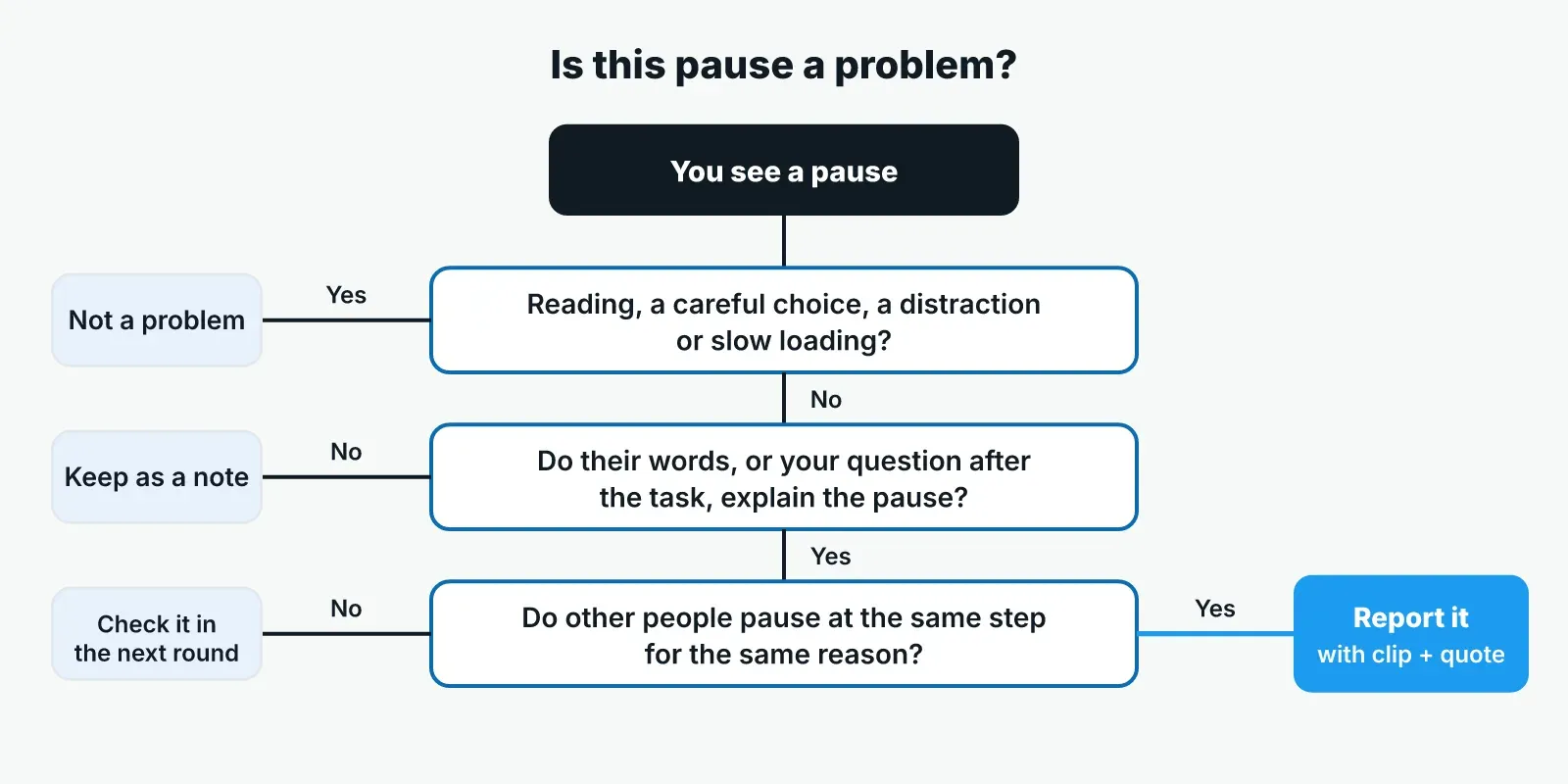
Plenty of pauses are healthy. A person who slows down before paying may be taking normal care with their money, which is what you want at that step. Before you call a pause a problem, check whether one of these simpler reasons explains it.
The recording usually shows which of these happened. A person who reads aloud, looks away from the screen or waits for a spinner is not confused by your design.
Never report a single pause as a problem without a second signal.
The words around a pause usually tell you what it meant. So before you decide anything, put the transcript line for that moment next to the screen. If the person said "hang on, where's the fee?", the pause was doubt. If they said "let me check the address", it was care.
When the person said nothing, ask after the task, not during it. A neutral question works best: "At the payment step you stopped for a moment. What were you looking for?" Avoid questions that suggest the answer, like "Was the fee confusing?", because people tend to agree with the version you hand them.
Stay quiet during the pause itself. If you jump in with help, you lose what you came to see. You want to know what the person does when nobody is there to guide them. This is one of the main habits of moderated testing, where a researcher watches live and can ask why once the task is done.
Behavior and words make more sense together. A recording gives you behavioral data, what people did, and the transcript gives you their reasons. Click data alone tends to miss those reasons, as the post on what click metrics miss about the why shows.
One person pausing once is a note. Several people pausing at the same step, and saying why, is a finding. To see the difference, log every pause in a grid. Note the step, the kind of pause and what the person said, then read down the step column.
Say the food delivery company tests the new checkout with five people. After the sessions, the research team's grid might look like this, with made-up entries:
| Step | Kind of pause | What the person said | Counts as |
|---|---|---|---|
| Basket | Re-reading | "Is the fee per order?" | Note |
| Payment | Back step | "Wait, where did the tip go?" | Finding (3 of 5) |
| Payment | Hover between buttons | "Which one pays?" | Finding (3 of 5) |
| Delivery time | Long pause | "Let me pick the later slot" | Not a problem |
Three of five people paused at payment and gave reasons, so the payment screen gets the fix. The pause at the delivery time was a careful choice, so it stays out of the problem list.
Compare hesitation with completion, too. All five may finish the order and still stall at the same spot. A team that only counts completed tasks would call that screen fine, but the pause shows where people slow down and lose trust.
When you write it up, keep what you saw and what you think it means on separate lines. "Three of five people went back from payment to the basket" is what you saw. "The tip control seems to hide the total" is your reading of it. Show the clip and the person's words for each finding, so others can judge it for themselves.
Use plain counts like "three of five" rather than percentages, because five people can't support a percentage. And don't turn pauses into a timing score unless you designed the study to measure time. If the cause is still unclear, say what the next round should check.
So report a pause as a problem only when it repeats at the same step and the person's words or a follow-up answer explain it. Treat everything else as a note for the next round.
Reading hesitation well depends on having the screen, the voice and a neutral follow-up question in one place. Pulse runs usability and task-based studies as AI-moderated interviews, so each person works through the task while the moderator listens.
Video insights capture on-screen behavior and emotion that a transcript misses, read beside what people say. Facial coding and tonality analysis add the look and sound of each moment. The AI moderator builds follow-up questions on what each person said earlier and asks a second question when an answer is vague. Every theme comes with its quotes, and every quote links to its transcript, so anyone on the team can check a reported moment against the session.
That leaves the research team's time for deciding which pauses matter and what to change. To see it on your own checkout or sign-up flow, book a demo, or start with a free trial and a free study.
No. Time on task tells you a step was slow, but it can't tell you whether the person was confused, careful or interrupted. Use it to find the steps worth watching, then watch those parts of the recordings and read what people said there before you call anything a problem.
There's no fixed length that works for every study, because reading speed, the screen and the task all change how long a normal pause lasts. Compare a pause with how long the same person took on similar steps. A pause that stands out for that person, at that step, is worth logging.
Usually not. Speaking during the pause can push the person toward an answer and hides what they would do on their own. Wait until the task ends, then ask a neutral question about that moment, such as what they were looking for. Step in early only if the person is stuck and the session can't go on.
Yes. Recordings of unmoderated tests show pauses, back steps and cursor movement. What they lack is a chance to ask why after the task. So add a short question at the end of each task, or follow up later with the people whose sessions showed the clearest pauses.
Participant recruitment methods compared by who you need: your own list, panels, referrals, networks and recruiters, plus a check before you set a date.
Semantic vs latent themes, from Braun and Clarke's paper "Using thematic analysis in psychology", shown on real-life quotes, with when to use each.
How to choose a transcription service for research interviews: test each option on your own audio with five simple checks, from accuracy to data safety.